Built for JobTread Users

Stop manually entering vendor bills into JobTread.

JobBox turns forwarded emails into vendor bills in JobTread — automatically. AI reads your invoices and receipts, you review and approve, and the bill posts to the right job. No downloading then uploading. No manual entry. No clicking through screens.

Start Your 14-Day Free Trial Plans start at $49/mo · No per-user fees · No charge until trial ends

You know the drill.

If you're processing 30, 50, or 100+ bills a week, that's hours of your time spent on data entry — time you could spend running jobs, managing crews, or getting home before dark.

And if bills are landing in different inboxes? Good luck keeping track of what's been entered and what hasn't.
1

An invoice hits your inbox

2

You download the attachment

3

Open JobTread. Click into the job.

4

Create a new document. Upload the file.

5

Manually type in the vendor, the amount, the line items

Then you do it again. And again. For every bill, on every job, every week.

Three steps. That's it.

Step 01

Forward the email

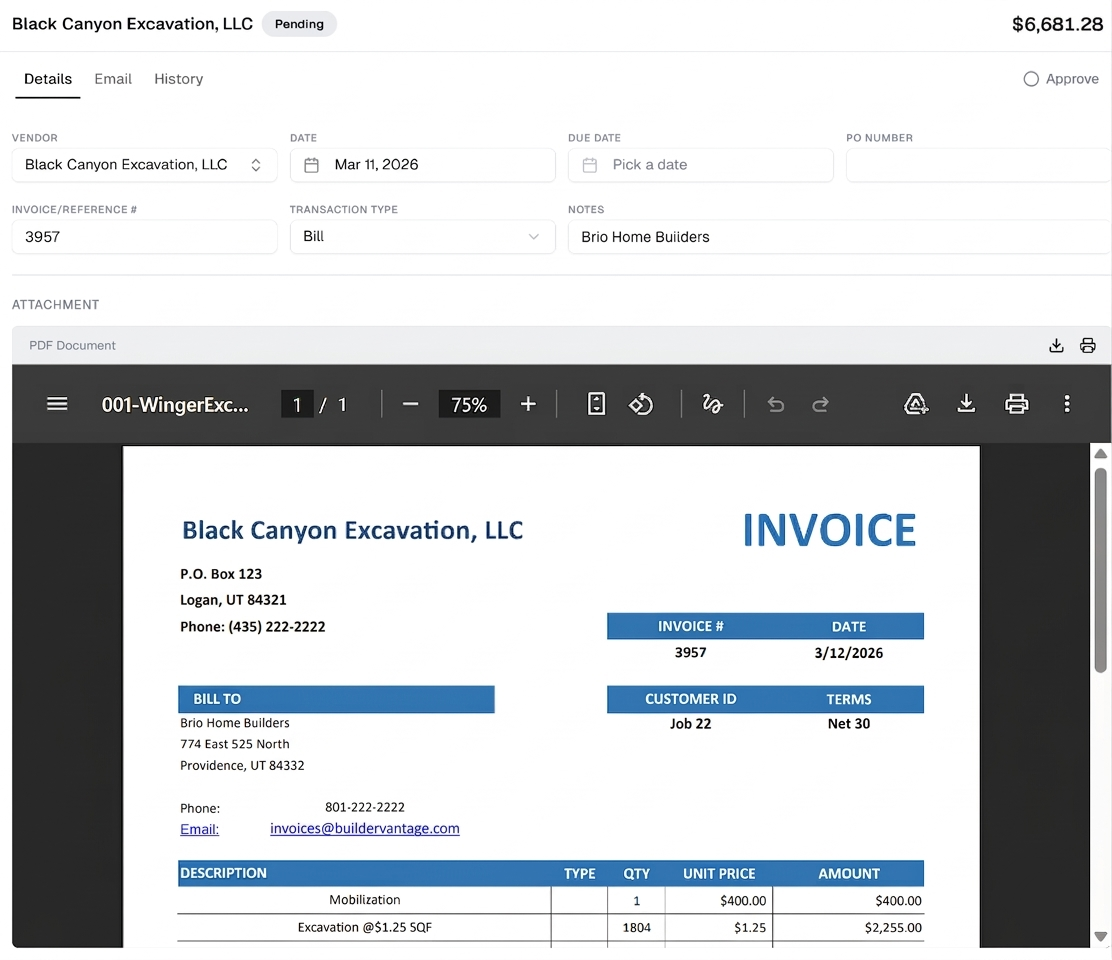
Got an invoice or receipt? Forward the email to your JobBox address. That's the entire first step — no downloading, no logging in anywhere.

Step 02

Review and approve

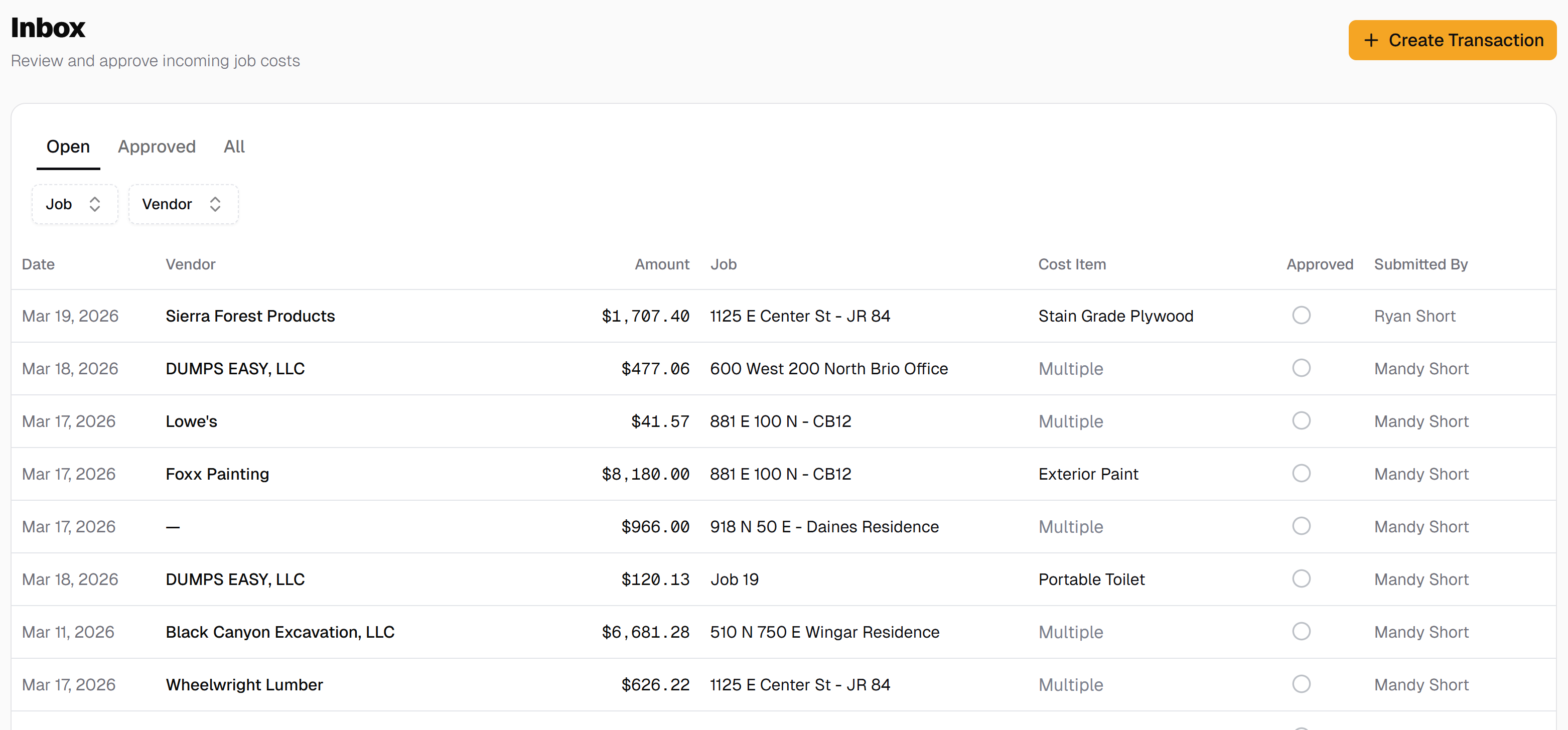
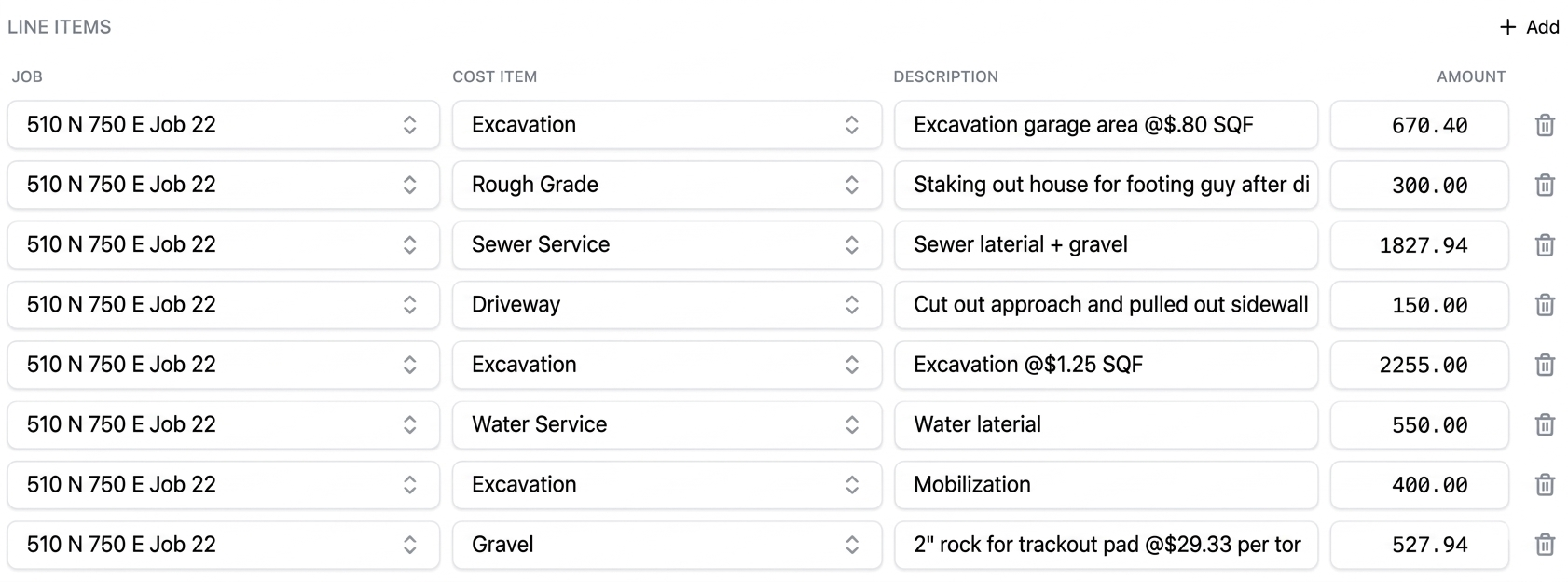
AI reads the invoice and fills in the details — vendor, amount, job, line items. You see everything in one inbox across all your jobs. Check it, fix anything that's off, and hit approve.

Step 03

It's in JobTread

The approved bill posts directly to JobTread as a payable vendor bill, assigned to the right job. No copy-pasting. No extra clicks.

Connect your JobTread account once and you're ready to go. First transaction takes about 30 seconds.

Why teams switch to JobBox

📥

One inbox for every job

JobTread shows you pending costs job by job. That means clicking into each job to see what's waiting. JobBox gives you a single inbox view across every job — review and approve all pending vendor bills without jumping between screens.

Save 5+ minutes per transaction

Manual entry means downloading files, navigating screens, typing fields, uploading attachments. With JobBox, you forward an email and review what AI already filled in. 50 transactions a week? That's over 4 hours back.

Review every bill before it hits JobTread

JobBox doesn't just dump costs into your system. Every transaction goes through your approval first. Catch wrong amounts, duplicate charges, or misassigned jobs before they become payable bills. You stay in control.

No QuickBooks middleman required

Other tools make you route bills through QuickBooks before they reach JobTread. That's an extra tool, extra cost, and extra steps. JobBox sends approved costs straight to JobTread. If you use QuickBooks too, you can push to it — but it's your choice.

We built JobBox because we needed it.

We're a JobTread shop. We were spending 5 hours every week manually entering vendor bills — downloading attachments, clicking through screens, typing in the same fields over and over.
Now? We handle all of our job costs in a single 40-minute meeting. Everything is already in the inbox, already read by AI. We just review, approve, and move on.
Our accounts payable has never been more accurate. Before JobBox, wrong amounts got paid to vendors because bills were entered without a formal review. Now every transaction gets checked before it touches JobTread. No more surprises.
Before
5 hours/week
After
40-minute meeting
Before
Bills entered without review
After
Every bill reviewed first
Before
Wrong amounts paid
After
Accurate payments, every time

What changes when you use JobBox

Without JobBox With JobBox
Invoices land in multiple email inboxes Forward everything to one JobBox address
Download each attachment manually Email forwarding — no downloads
Navigate into each job in JobTread All jobs visible in a single inbox
Click through screens to create a document AI creates it from the email
Upload the file and type every field AI reads and fills in the details
Check each job individually for pending costs Review and approve across all jobs at once
5+ minutes per bill Seconds per bill

Built for the people who actually enter the bills.

Company Owners

You're already wearing ten hats.

Data entry shouldn't be one of them. Forward vendor emails when they come in — from the job site, the truck, wherever — and approve costs when you have a few minutes. All your pending bills, across all your jobs, in one screen.

Office Managers

You're the one doing the clicking.

You know exactly how many steps it takes to enter a single vendor bill into JobTread. JobBox cuts that down to forwarding an email and reviewing what AI filled in. Process a full day's worth of invoices in the time it used to take to enter a handful.

Simple pricing. No per-user fees.

Every plan includes the same features. Just pick your volume.

How many vendor bills do you process per month?

We'd recommend the Pro plan. You can always switch during your trial.

Base
$49/mo
Up to 100 transactions/month
  • AI-powered data extraction
  • Single inbox across all jobs
  • Direct JobTread integration
  • Email support
Start 14-Day Free Trial

No charge until your trial ends

Overages processed at $0.20/transaction

Premier
$149/mo
Up to 1,200 transactions/month
  • AI-powered data extraction
  • Single inbox across all jobs
  • Direct JobTread integration
  • Priority support + onboarding
Start 14-Day Free Trial

No charge until your trial ends

Overages processed at $0.05/transaction

Not sure which plan? Start your trial on any plan — you can switch anytime before you're charged.

Common questions

I already pay for JobTread. Why do I need another tool? +
JobTread is where you manage your jobs. JobBox is how you get vendor bills into JobTread without the manual work. If you're entering more than a few bills a week, JobBox saves you hours — and at $49/mo, it pays for itself after the first handful of transactions.
How accurate is the AI at reading invoices? +
The AI extracts vendor names, amounts, line items, and other details from your invoices and receipts. You review everything before approving — nothing posts to JobTread without your sign-off. If something's off, you correct it in the review step. You're always in control.
Is it hard to set up? +
Connect your JobTread account, and you're done. No technical setup, no IT department needed. You just need your organization Id. Forward your first email and you'll see it working in under a minute.
Does it work with QuickBooks too? +
Yes. JobBox sends costs directly to JobTread — no QuickBooks required. But if you do use QuickBooks, you can push approved bills there too from JobTread. It's optional, not mandatory.
What counts as a transaction? +
Each invoice, receipt, or vendor bill you process through JobBox counts as one transaction. Your plan's limit is based on how many transactions you process per month.

You've got better things to do than type in vendor bills.

Connect your JobTread account and forward your first invoice. You'll see why it's worth it before your first cup of coffee gets cold.

Start Your 14-Day Free Trial

Plans start at $49/mo · No per-user fees · No charge until trial ends